Table of Contents
SSL certificate renewal is the process of replacing an expiring, revoked, or untrusted SSL/TLS certificate with a new one from a trusted certificate authority (CA). If you use eMudhra or emSign certificates, review your certificate chain now and plan your migration.
Here’s why it’s urgent. On October 22, 2026, eMudhra’s board decided to voluntarily withdraw from the global SSL/TLS certificate business. That followed a security incident: a security researcher reported weak private keys in eight intermediate CAs under the emSign ECC Root CA – G3 hierarchy, and browser vendors then blocked them.
In this guide, you’ll learn how to:
- Check whether your SSL certificate is affected
- Identify your certificate chain and issuer
- Choose a replacement certificate
- Install and test the new certificate
- Automate future SSL certificate renewals
Quick answers
- Using eMudhra or emSign? Check your certificate chain today.
- Certificate expired? Renew immediately.
- Missing intermediate? Install the complete chain.
- Many domains? Use centralized SSL certificate management.
- Want to avoid future expiry? Turn on automated renewal alerts.
Why SSL certificate renewal matters after eMudhra’s exit
Browsers trust a certificate only if its issuing chain is trusted. When that trust breaks, visitors see a full-page security warning. Many won’t click through.
eMudhra’s official statement confirms the withdrawal. The company says it is now issuing from its G1 RSA roots only to support an ongoing customer transition, and will stop once that finishes. Mozilla has removed the emSign ECC Root CA – G3 from its trust store (Mozilla Security Blog). Google said the root’s removal from the Chrome Root Store was expected to reach all devices on the morning of October 27, 2026 (Pacific time), and told website operators with certificates chaining to that root to install a new certificate immediately. Computerworld has a good summary of the browser actions.
So why does this matter if your certificate hasn’t expired? Because a certificate can be within its validity period and still fail if its issuing chain is revoked, distrusted, or incomplete. Renewing early protects your uptime and your customers’ confidence.
What is an SSL certificate chain?
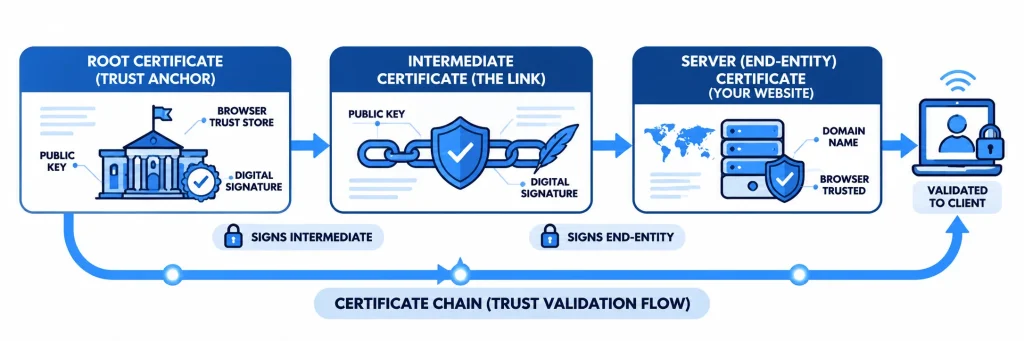
An SSL certificate chain is the trust path between your server certificate, one or more intermediate certificates, and a trusted root certificate. Browsers verify this chain before they open a secure HTTPS connection.
Think of it as a chain of introductions. Your certificate says who you are. An intermediate certificate, issued by the CA, vouches for it. A root certificate, built into browsers and operating systems, vouches for the intermediate.
A browser checks every link. If one link is revoked or distrusted, the whole chain fails. That’s why an incident like this can affect customers who did nothing wrong. The problem sits in the issuing hierarchy, not necessarily your server’s private key. You should still generate a new key when you replace the certificate.
Is your SSL certificate expired or affected?
An SSL certificate expires when its validity date passes. An affected certificate is different. It may still be in date but chain to a revoked or distrusted CA.
Both end the same way, with browser warnings, failed API calls, and abandoned carts. You may be affected if:
- Your browser shows “Your connection is not private.”
- Your monitoring tool flags a trust or chain error.
- Your certificate issuer reads “emSign” or “eMudhra.”
- A partner’s integration suddenly can’t connect to you.
If the certificate has expired, renew it immediately. If it chains to the emSign ECC Root CA – G3, replace it now. If it chains to eMudhra’s G1 roots, it is still trusted today, but plan to move to an independent CA before eMudhra finishes its exit.
How to check for an SSL certificate issue
Open your site, click the padlock, and read the issuer and certification path. Then confirm the full chain is installed on every service you run.
For a deeper check, run:
openssl s_client -connect yourdomain.com:443 -showcerts
Search the output for “emSign” or “eMudhra.” Then repeat the check for every service, not just your homepage. APIs, load balancers, and internal tools often use separate certificates.
A missing intermediate is a common SSL certificate issue, and it breaks some devices even when your certificate is fine. If you see a trust error, fix it by installing the complete chain your CA provides. You can also run your domain through our SSL checker.
Replacing your website certificate may not fix everything. Systems that keep their own trust stores, such as Java keystores, container images, mutual TLS setups, proxies, load balancers and security appliances, may need separate updates. Computerworld’s report discusses these dependencies in more detail.
5 steps to renew SSL certificates and migrate from eMudhra
Audit your certificates, identify affected chains, choose a replacement, install and test it, then automate future renewals. Here’s each step.
1. Audit every domain and certificate
Find every domain, subdomain, API, server, load balancer, and internal system. Record the issuer, expiration date, and install location. Forgotten certificates on staging servers cause outages, so check certificate transparency logs and scan your network.
2. Identify the certificate chain and issuer
Sort your inventory by issuer. Flag every certificate that chains to eMudhra or emSign. Certificates under the G3 ECC root come first, then those under the G1 RSA roots. Then confirm each remaining chain is complete and current.
3. Choose the right replacement certificate
Match the certificate to what you need to prove. Domain validation suits simple sites. Organization or extended validation suits businesses and payment pages. Wildcard and multi-domain certificates cut the work when you manage many hostnames. The comparison table below covers each option.
If you bought directly from eMudhra, ask them first. They say they are offering free Sectigo replacements to their TLS customers. If you want to compare options or manage several CAs in one place, you can also choose a certificate through HashSSL.
4. Install and test the renewed certificate
Generate a new CSR and a new private key. Don’t reuse the old key. Complete validation, then install the certificate with the full intermediate bundle.
Then test:
- Load every hostname in a browser.
- Run an SSL checker to confirm the chain.
- Test APIs, mobile apps, and integrations.
After you’ve installed and tested the replacement across every hostname and integration, revoke the old certificate if appropriate.
5. Set up ongoing SSL certificate management and automate renewals
A CA can lose trust or leave the market fast. Build a repeatable process with a central inventory, expiration alerts, automated renewal, and a plan for switching CAs. We cover this in detail below.
Need help migrating from eMudhra? Identify affected certificates, choose a trusted replacement CA, and manage your SSL certificate renewals from one place.
Which SSL certificate should you choose?
The right certificate depends on what you need to prove, not only what you need to encrypt. All valid certificates provide the same kind of encrypted connection. The difference is how much identity checking sits behind them.
| Certificate Type | Best For | Main Benefit |
|---|---|---|
| DV (Domain Validation) | Blogs & simple websites | Fast validation |
| OV (Organization Validation) | Business websites | Organization validation |
| EV (Extended Validation) | Enterprise/payment environments | Stronger identity validation |
| Wildcard | Multiple subdomains | Protects many subdomains |
| Multi-Domain | Multiple domains | Manage several domains under one certificate |
If you run a store or handle logins, choose OV or EV. A wildcard SSL certificate simplifies subdomains. A multi-domain SSL certificate consolidates a brand portfolio.
Watching your budget? You don’t have to give up trust to keep costs down. A cheap SSL certificate from an established brand can still be a sound choice for a simple site. Compare affordable SSL certificate options from DigiCert, Sectigo, and GeoTrust, then buy a trusted SSL certificate that fits your validation needs.
Not sure which SSL certificate you need?
Find the Right SSL Certificate
SSL certificate renewal checklist
Use this migration checklist for each domain:
- ☐ Find all certificates
- ☐ Check expiration dates, including any SSL certificate expired warnings
- ☐ Identify the certificate issuer
- ☐ Check the certificate chain
- ☐ Identify affected eMudhra or emSign certificates
- ☐ Choose a replacement CA
- ☐ Generate a new CSR and private key
- ☐ Install the complete certificate chain
- ☐ Test all services
- ☐ Revoke the old certificate
- ☐ Configure renewal alerts
How to prevent SSL certificate expiration
Keep one inventory, set alerts well before expiry, and automate renewal wherever your stack allows.
- Central inventory. Track every certificate, owner, and expiry date in one place. HashSSL is launching its own SSL management tool soon to help you do this.
- Expiration alerts. Notify your team at intervals such as 60, 30, and 14 days.
- Automated renewal. Automate issuance and installation where you can.
- CA agility. Know how to switch providers quickly, before you have to.
NIST’s guidance on TLS server certificate management (SP 1800-16) supports inventorying certificates and automating their lifecycle to reduce human error.
Why choose HashSSL for SSL certificate renewal?
HashSSL gives you one place to buy, renew, and track certificates from leading CAs. Renew with DigiCert, Sectigo, or GeoTrust. Choose single-domain, wildcard, or multi-domain coverage. Our team guides you through validation and installation, and agencies can manage renewals across many client domains.
Automate SSL Certificate Management With HashSSL
FAQs
What is SSL certificate renewal?
SSL certificate renewal replaces an expiring or untrusted certificate with a new one. You generate a new CSR, complete validation, and install the new certificate before the old one stops working.
How do I renew an SSL certificate?
Generate a new CSR and private key, choose your certificate type, and complete validation with your CA. Then install the certificate and intermediate bundle, and test every hostname.
When should I renew my SSL certificate?
Start at least 30 days before expiration. That leaves time for validation, installation, and testing. If your certificate chains to emSign ECC Root CA – G3, replace it now. If it chains to eMudhra’s G1 roots, plan your move before eMudhra finishes its exit.
What happens if an SSL certificate expires?
Browsers show a security warning, and visitors may leave. APIs and integrations that validate certificates can also fail. Renew immediately if your SSL certificate has expired.
Can I renew an SSL certificate before it expires?
Yes. Most CAs let you renew ahead of expiry, and many add the remaining days to the new term. Policies vary, so check your CA’s terms.
What is an SSL certificate chain?
It’s the path of trust from your server certificate, through intermediate certificates, to a trusted root. Browsers check each link. A broken or distrusted link causes security warnings.
How do I check my SSL certificate?
Click the padlock in your browser and view the certificate details. For more detail, run an SSL checker or the OpenSSL command shown above. Look at the issuer, expiry date, and full chain.
Why is my SSL certificate showing a trust error?
The certificate may be expired, issued by a distrusted CA, or missing an intermediate certificate. Check the issuer and the chain first. Then reinstall the certificate with the full bundle.
How do I fix an SSL certificate chain issue?
Download the complete chain from your CA. Install the intermediate certificates alongside your server certificate, restart the service, and test again. If the chain leads to a distrusted root, replace the certificate.
Is eMudhra still issuing SSL certificates?
eMudhra announced on October 22, 2026, that it is exiting the global SSL/TLS certificate business. It says it is issuing from its G1 roots only to support an ongoing customer transition, and will stop once that finishes. It describes its other digital trust services as separate.
How do I migrate from eMudhra to another CA?
Audit your certificates and find every chain that includes emSign. Choose a replacement from a trusted CA, install it with a new private key, test it, and revoke the old one.
Which SSL certificate should I choose?
Choose DV for simple sites, OV for business sites, and EV for payment or enterprise environments. Add wildcard or multi-domain coverage if you manage many hostnames.
What is the difference between DV, OV, and EV certificates?
DV confirms you control the domain. OV adds verified organization details. EV applies the strictest identity checks. All three can provide an encrypted connection.
How can I manage SSL certificates across multiple domains?
Use a central inventory with expiration alerts, and automate where possible. A platform like HashSSL tracks and renews certificates across many domains in one place.
Can SSL certificate renewal be automated?
Yes, in many setups. Protocols such as ACME let servers request and install renewals automatically. Check that your CA and hosting stack support it.
Final takeaway: don’t wait for the next browser warning
SSL certificate renewal protects your traffic, your visitors, and your reputation. The eMudhra exit is a clear reminder to know your chains and keep your options open. Don’t wait for your SSL certificate to expire. Audit your certificates, replace affected ones, and set up automated renewal management.