Quick Answer: You can install an ACME SSL certificate on cPanel using an ACME client such as acme.sh. Open the cPanel Terminal, install acme.sh, register an ACME account with your certificate authority's server URL and EAB credentials, issue the certificate using webroot validation, then deploy it to cPanel with the cpanel_uapi deploy hook. Finally, verify HTTPS and test automatic renewal.
Table of Contents
Steps to install an ACME SSL Certificate on cPanel
This tutorial explains the step by step process for installing and configuring an ACME SSL certificate on a cPanel hosting account using ACME.sh with SSH access enabled.
Most cPanel hosting environments support ACME SSL certificates as long as SSH access is available on the account. Many hosting providers enable SSH access by default on shared hosting plans. If you are managing accounts through WHM, make sure the Shell Access option is enabled for the hosting package.
Need an ACME-ready certificate first? Get a HashSSL Automated + ACME certificate or Sectigo ACME Certificate as a Service, which provides the server URL and EAB credentials used in this guide.
Step 1: Access the SSH Terminal
You can access the terminal directly from your cPanel account by following these steps:
- Log in to your cPanel account.
- Scroll down to the Advanced section.
- Click on Terminal.
- Select I Understand if prompted.
You may also use a third-party SSH client if preferred. Some hosting providers use a custom SSH port instead of the default port 22, so check your hosting provider’s documentation if needed.
Step 2: Install ACME.sh
Run the following command to install ACME.sh. Unlike many ACME clients, ACME.sh works properly within the restricted SSH environments commonly used in cPanel hosting accounts.
curl https://get.acme.sh | sh
Step 3: Register With the ACME Server
Execute the following command to register your account with the ACME server:
~/.acme.sh/acme.sh --register-account --server SERVER --eab-kid EAB_KID --eab-hmac-key EAB_HMAC_KEY
Replace the placeholders below with the values provided by your Certificate Authority:
- SERVER = The ACME server URL provided by the CA, for example:
https://acme.sectigo.com/v2/DV - EAB_KID = The EAB KID or Mac ID provided by the CA.
- EAB_HMAC_KEY = The EAB Mac Key supplied by the CA.
If you receive a command not found error, replace ~/.acme.sh/acme.sh with the full installation path. You can usually locate it in the installation output, which looks similar to:
Installed to /home/username/.acme.sh/acme.shcepttos
Step 4: Issue and Deploy the SSL Certificate
Run the following command to issue and download the SSL certificate:
~/.acme.sh/acme.sh --issue --webroot /path/to/webroot --domain yourdomain.com --deploy-hook cpanel_uapi --server SERVER --eab-kid EAB_KID --eab-hmac-key EAB_HMAC_KEY
Update the placeholders below with your own values:
- SERVER = The ACME server URL supplied by your CA.
- EAB_HMAC_KEY = The EAB Mac Key provided by your CA.
- yourdomain.com = Your full domain name. To secure both www and non-www versions, repeat the domain parameter like this:
--domain mydomain.com --domain www.mydomain.com - /path/to/webroot = Your website document root, typically something similar to:
/home/username/public_html/You can find this path listed as the Home Directory inside cPanel.
After the certificate has been successfully issued, run the following command to deploy it to cPanel:
~/.acme.sh/acme.sh --deploy --domain yourdomain.com --deploy-hook cpanel_uapi
Step 5: Verify the SSL Installation
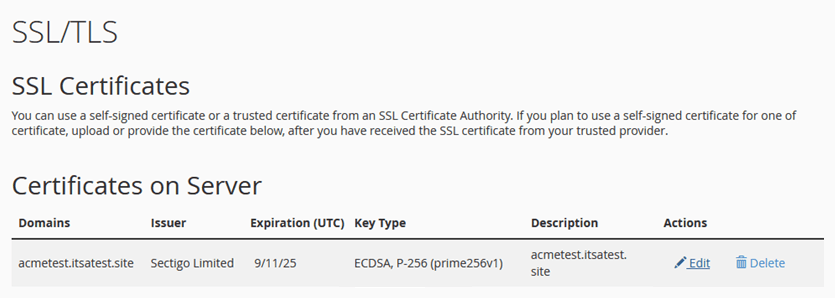
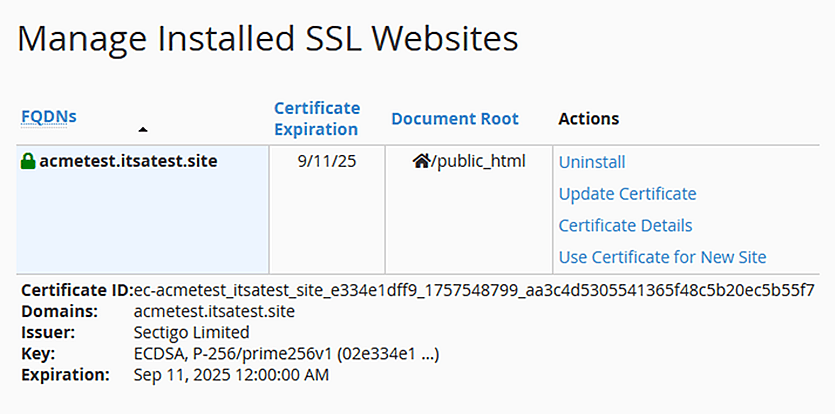
Once deployment is completed, the SSL certificate should appear inside cPanel under:
- SSL/TLS > Certificates
- SSL/TLS > Manage SSL Sites
ACME.sh automatically renews SSL certificates approximately 30 days before expiration. It is recommended to test the renewal process to ensure the server is configured correctly.
Run the following command to force a renewal and redeployment test:
~/.acme.sh/acme.sh --cron --force
After the command completes successfully, verify the updated certificate by checking the Certificate ID under Manage SSL Sites.
How to Install SSL for www and Non-www Domains
A single ACME certificate can cover both versions of your site by listing each name:
--domain example.com --domain www.example.com
The certificate then includes both names as Subject Alternative Names (SAN). Make sure both names point to the same server and document root, otherwise validation fails for the one that does not.
For multiple domains with different document roots, issue a separate certificate for each site, or use one –webroot per domain with the -w option placed before each -d:
~/.acme.sh/acme.sh --issue -d example.com -w /home/username/public_html -d shop.example.com -w /home/username/shop
Wildcard certificates cannot use webroot validation. They require DNS-01 validation and a certificate product that supports wildcards.
Frequently Asked Questions About ACME SSL on cPanel
What is ACME SSL on cPanel?
It is an SSL/TLS certificate issued and renewed through the ACME protocol and installed on a cPanel account, usually with a client such as acme.sh.
Do I need SSH access to install ACME SSL on cPanel?
For the acme.sh method, yes. You need the cPanel Terminal or an SSH connection. If your host has disabled shell access, ask them to enable it or use AutoSSL instead.
Can I install an ACME SSL certificate without root access?
Yes. acme.sh installs in your home directory and runs under your cPanel user, so root access is not required.
What is acme.sh?
acme.sh is a lightweight, open-source ACME client written as a shell script. It supports many CAs and includes a deploy hook for cPanel.
Is ACME SSL free?
It depends on the CA. The ACME protocol itself is free, and some CAs such as Let’s Encrypt issue free certificates. Commercial CAs charge for their certificates and use ACME to automate delivery.
What is EAB in ACME SSL?
External Account Binding links your ACME client to your paid account at the CA, using an EAB KID and an HMAC key, so certificates are issued under your subscription.
What is an ACME server URL?
It is the address of the CA’s ACME service, for example https://acme.sectigo.com/v2/DV. Your CA supplies it.
How do I renew an ACME SSL certificate on cPanel?
You usually do nothing. acme.sh runs a daily cron job, renews certificates in their renewal window, and redeploys them through the saved cpanel_uapi hook. You can test it with –renew –force.
Can ACME SSL secure both www and non-www domains?
Yes. Add both names with separate –domain options when you issue the certificate.
Can ACME SSL secure wildcard domains?
Yes, with a wildcard-capable certificate and DNS-01 validation. Webroot validation cannot validate wildcards.
What is the difference between ACME SSL and AutoSSL?
AutoSSL is cPanel’s built-in automation, which issues free certificates from its configured provider. Manual ACME with acme.sh lets you choose the CA, including commercial brands, and control issuance yourself.
Can I use a commercial SSL certificate with ACME?
Yes. Commercial CAs such as Sectigo offer ACME-enabled products. You receive an ACME server URL and EAB credentials, then follow the steps in this guide.
Why is my ACME challenge failing, or my certificate not showing in cPanel?
Challenge failures are usually caused by DNS pointing elsewhere, a wrong webroot, a blocked /.well-known/ path or a CAA restriction. A certificate that is issued but missing from cPanel usually means the deploy step did not complete. See the troubleshooting section above.
How long does ACME SSL installation take?
Once you have your credentials, the setup typically takes 10 to 15 minutes. Issuance itself takes seconds to a few minutes.