Quick Answer:
- SSL certificate automation uses an ACME client, such as Certbot or acme.sh, to renew certificates on a schedule before they expire.
- Renewal and deployment are separate steps. The server must reload to serve the new certificate.
- Public certificates are limited to 200 days today and 47 days from March 2029, so manual renewal will not keep up.
- Test with certbot renew –dry-run and monitor expiry independently, because CA expiry emails cannot be relied on.
What happens when your SSL certificate expires without warning? Visitors see a full-page security warning, secure connections fail, and customers start to lose trust in your business. If renewal depends on someone remembering a date for every domain and every server, one missed reminder is enough.
That risk is growing. Under CA/Browser Forum Ballot SC-081v3, the maximum lifetime of a publicly trusted certificate fell to 200 days on March 15, 2026, and it will drop to 47 days by March 2029. More renewals mean more chances to miss one.
If you want to automate SSL certificate renewal and stop expiry surprises, then this blog is just for you. It explains how automation works, which tools to use, how to set up Certbot with NGINX, and how to monitor the result.
Table of Contents
What Is SSL Certificate Automation?
SSL certificate automation is the process of requesting, validating, renewing and deploying SSL/TLS certificates with software instead of manual steps. An ACME client, the software on your server that talks to the Certificate Authority (CA), handles each step on a schedule using the ACME protocol (RFC 8555).
People still say “SSL”, but modern websites use Transport Layer Security (TLS) to encrypt traffic between browsers and servers. The certificate is the same either way.
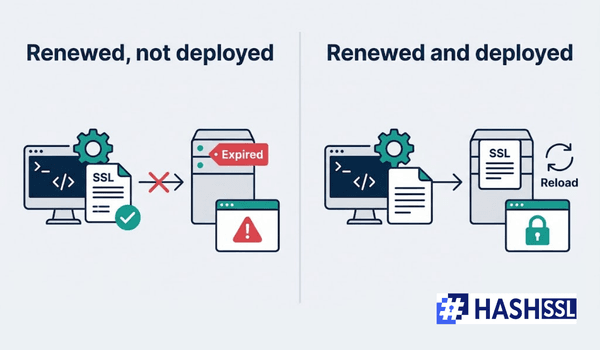
Important: A renewed certificate is not finished until it is installed and served on the live site. Automation must cover deployment and verification, not only renewal.
What Happens When an SSL Certificate Expires?
When a certificate expires, browsers stop trusting the connection and show a full-page warning such as “Your connection is not private”. Most visitors leave at that point.
- Websites: Visitors and search engine crawlers hit an error instead of your page.
- APIs and apps: Clients reject the connection, so integrations and mobile apps fail.
- Email and other services: Mail servers and internal tools that use the certificate can stop connecting.
The problem lasts until a valid certificate is installed, which is why prevention matters more than a fast fix.
Why Are SSL Certificate Lifetimes Getting Shorter?
The CA/Browser Forum, which sets the rules for publicly trusted certificates, approved a phased reduction in maximum validity (Ballot SC-081v3):
| Certificate issued on or after | Maximum validity |
|---|---|
| March 15, 2026 | 200 days |
| March 15, 2027 | 100 days |
| March 15, 2029 | 47 days |
Let’s Encrypt is moving faster. Its default lifetime drops from 90 to 64 days on February 10, 2027, and to 45 days in 2028 (Let’s Encrypt).
If you manage ten certificates, a 47-day lifetime means well over a hundred renewals a year. Doing that by hand is not realistic.
Important: Let’s Encrypt stopped sending expiry reminder emails on June 4, 2025 (Let’s Encrypt). Do not rely on your CA to warn you. Set up your own monitoring.
Why Is Automated SSL Certificate Renewal Important?
When you manage several domains and servers, the chance of forgetting to renew a certificate grows with every manual renewal. With automated SSL certificate renewal, you can:
- Prevent unexpected expiry: Renew certificates well before their validity period ends.
- Reduce manual work: Stop tracking dates and repeating the same steps for every site.
- Keep connections secure: Deploy and serve renewed certificates the same way every time.
- Manage many websites: Use one standard renewal process across domains and servers.
- Catch failures early: Combine automation with monitoring to detect problems before visitors do.
Automation reduces human error, but a misconfigured setup can still fail silently. That is why testing and monitoring are part of every step below.
| Manual renewal | Automated renewal | |
|---|---|---|
| Renewal tracking | Calendar, spreadsheet or reminder emails | ACME client checks expiry on a schedule |
| Validation | Done by hand for every order | Completed by the client (HTTP-01 or DNS-01) |
| Deployment | Copy files and restart the server | Plugin or deployment hook reloads the service |
| Scale | Effort grows with each certificate | Many domains handled the same way |
| Typical failures | Missed reminders, wrong file installed | Blocked port 80, DNS errors, failed hooks |
| Best for | A few certificates, legacy devices | Web servers, hosting, cloud and containers |
*Manual vs. automated SSL certificate renewal.*
How Does SSL Certificate Automation Work?
An automated SSL renewal follows the same cycle every time:
- Certificate request: The ACME client requests a certificate from the CA.
- Domain validation: The CA confirms you control the domain through a challenge, such as HTTP-01 or DNS-01.
- Certificate issuance: The CA issues the certificate after validation succeeds.
- Automated renewal: On a schedule, the client checks expiry and requests a replacement when renewal is due.
- Certificate deployment: The renewed certificate is installed and the service is reloaded.
- Verification: The live server is checked to confirm it serves the new, valid certificate.
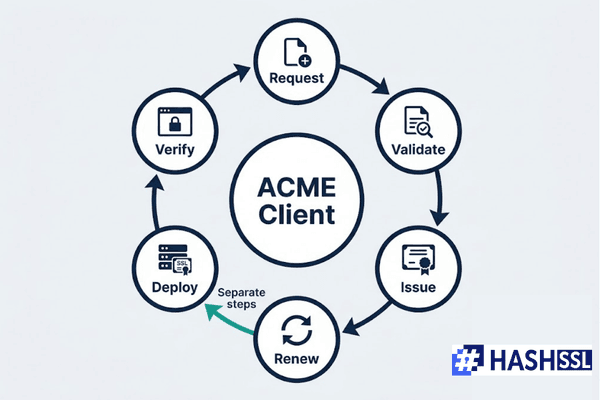
Renewal and deployment are two separate steps. A certificate can renew successfully while the server keeps serving the old one from memory until the service is reloaded. If the reload never happens, visitors see the old certificate until it expires.
Validation is the same check a CA performs for any DV certificate. To understand the manual version, read our guide on how to complete domain control validation.
Which Tools Can Automate SSL Certificate Renewal?
The right tool depends on where your certificate is used. Certbot and acme.sh cover most Linux servers.
1. Certbot
Certbot is an ACME client maintained by the EFF, with plugins for NGINX and Apache. It requests certificates, edits the web server configuration and sets up automatic renewal. It is the simplest choice for a standard web server with root access.
2. acme.sh
acme.sh is a lightweight shell-based ACME client that supports many CAs and DNS providers. It does not need root access for most modes, which suits shared hosting and cPanel. See our cPanel ACME SSL setup guide for a full walkthrough.
3. Other environments
| Environment | Common option |
|---|---|
| Windows and IIS | win-acme or Posh-ACME |
| Kubernetes | cert-manager |
| Web server with built-in HTTPS | Caddy, which renews certificates automatically |
| Cloud load balancers and CDNs | The provider’s managed certificates, or upload certificates through its API |
| Shared hosting and cPanel | The host’s AutoSSL or acme.sh with the cPanel deploy hook |
Tip: Whatever tool you use, list every certificate first, with its domain, CA, expiry date and the server it runs on. You cannot automate what you have not counted.
HTTP-01 vs. DNS-01 Validation
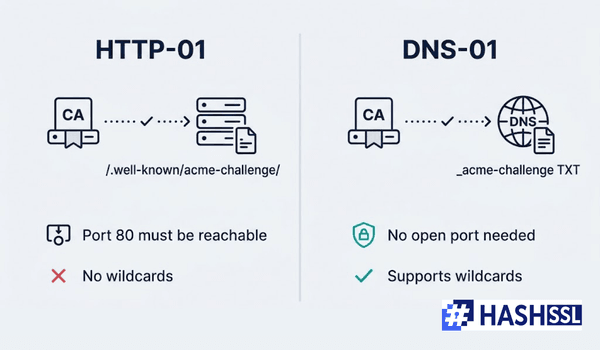
The validation method decides how the CA checks that you control a domain (Let’s Encrypt challenge types).
| Feature | HTTP-01 | DNS-01 |
|---|---|---|
| How it works | Places a challenge file at /.well-known/acme-challenge/ | Adds a TXT record at _acme-challenge |
| Requirement | Port 80 reachable from the internet | API access to your DNS provider |
| Wildcard certificates | Not supported | Supported |
| Best for | Single, publicly reachable web servers | Wildcards, internal servers and multi-server setups |
Ideal for DNS-01: Administrators who manage wildcard SSL certificates, servers that are not public, or many servers behind a load balancer.
Important: If you automate DNS updates, use an API token limited to the zones and record types the client needs, and protect it like a password.
How Do You Automate SSL Certificate Renewal with Certbot and NGINX?
Here is how to set up automated SSL renewal with Certbot on an NGINX server, using Let’s Encrypt. The commands follow the Certbot documentation.
Step 1: Install Certbot
Install Certbot with snap, as the Certbot instructions recommend for most Linux systems:
sudo snap install --classic certbot
sudo ln -s /snap/bin/certbot /usr/bin/certbot
Step 2: Request an SSL certificate
Request a certificate for both versions of your domain. The NGINX plugin completes HTTP-01 validation and updates your NGINX configuration:
sudo certbot --nginx -d example.com -d www.example.comReplace the placeholders: Use your own domain names. Make sure both names point to this server and port 80 is open.
Step 3: Check the renewal schedule
Certbot installs a systemd timer or cron job that runs renewal automatically. Confirm that it is active:
systemctl list-timers | grep certbotDo not assume renewal is scheduled just because the certificate was issued. Certbot 4.0 and later renews when less than one-third of the certificate’s lifetime remains.
Step 4: Test automated renewal
Run a dry run. It performs a full renewal against the staging environment without replacing your live certificate:
sudo certbot renew --dry-run
Fix any error before you rely on automatic renewal in production.
Step 5: Add a deployment hook if needed
When you use the NGINX plugin, Certbot normally reloads NGINX after a successful renewal. A deployment hook matters most when the certificate is also used by another service, such as a mail server or HAProxy, when you use standalone or webroot mode, or when you run a custom setup.
Create an executable script in Certbot’s deploy hooks directory. This example tests the NGINX configuration before reloading:
sudo nano /etc/letsencrypt/renewal-hooks/deploy/reload-nginx.sh

#!/bin/sh
set -eu
nginx -t
systemctl reload nginx

sudo chmod 755 /etc/letsencrypt/renewal-hooks/deploy/reload-nginx.sh
Tip: Certbot runs every executable file in that directory after each successful renewal. The nginx -t test stops an invalid configuration from being reloaded.
Step 6: Verify the live certificate
Check what visitors actually receive, not only what Certbot reports:
echo | openssl s_client -connect example.com:443 -servername example.com 2>/dev/null | openssl x509 -noout -subject -issuer -datesThe notAfter value is the expiry date. If it has not changed after renewal, the server is still serving the old certificate. You can also check the issuer, expiry and chain with the HashSSL SSL Checker.
How Do You Monitor SSL Certificate Expiry?
Monitoring is your backup when automation fails without anyone noticing. Use at least one check that runs outside the server that renews the certificate:
- Certificate or uptime monitors: External services that check your certificate and alert you before it expires.
- Prometheus blackbox exporter: Probes your HTTPS endpoints and exposes probe_ssl_earliest_cert_expiry for alert rules.
- Renewal logs: Send Certbot or acme.sh errors to someone who will act on them.
- Manual checks: Run the OpenSSL command above or the SSL checker after any server, DNS or hosting change.
Tip: Set alerts at 14, 7 and 3 days before expiry. With healthy automation, none of them should ever fire.
What about load balancers and multiple servers?
When several servers share one certificate, validate and renew in one place, then copy the certificate to every server or upload it to the load balancer. DNS-01 works well here because it does not need each server to serve the challenge file. Remember that a CDN or load balancer may hold its own copy of the certificate, so check it separately.
Why Is My SSL Certificate Renewal Failing?
If an automated renewal does not complete, check these common issues first:
| Symptom | Likely cause | Fix |
|---|---|---|
| HTTP-01 challenge fails | Port 80 blocked, or a redirect, firewall or WAF stops the CA | Open port 80 and allow /.well-known/acme-challenge/ |
| DNS-01 challenge fails | Wrong TXT record, slow propagation or a DNS token without permission | Check the record name and value, wait longer, fix the API token scope |
| “Too many requests” error | CA rate limit reached | Test with staging (–dry-run) and retry later (rate limits) |
| Permission denied | Client or hook cannot read the key or write the files | Fix file ownership and permissions without exposing private keys |
| Old certificate still served | Service never reloaded, or a CDN holds a copy | Add a deployment hook and update the CDN or load balancer |
| Renewal never ran | Timer or cron job disabled | Run systemctl list-timers and re-enable the job |
| CA refuses to issue | CAA record does not allow the CA | Add the CA to your CAA record |
Let’s Encrypt, for example, allows 50 certificates per registered domain every 7 days and 5 failed validations per domain per account per hour (rate limits).
Tip: A failed renewal does not remove your current certificate. Run the client in verbose mode, fix the cause, and run a dry run before the expiry date.
How Do You Keep Automated SSL Secure?
Automation touches private keys and DNS, so lock both down:
- Protect private keys: Keep them readable only by root or the service account, and never send them to anyone.
- Use CAA records: Limit which CAs may issue for your domain, for example example.com. CAA 0 issue “letsencrypt.org”.
- Restrict DNS access: Use API tokens scoped to the zones and record types the client needs.
- Revoke a compromised certificate: Run sudo certbot revoke –cert-name example.com –reason keycompromise, then issue a new certificate with a new key.
- Keep a recovery plan: Keep the previous working certificate until the replacement is verified.
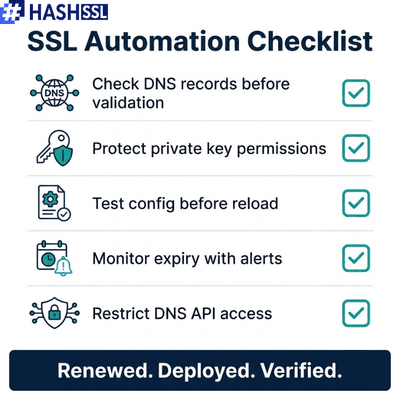
Quick self-check: Can you confirm that your certificate renews automatically, the new certificate reaches the live server, and you receive an alert if either step fails? If not, review your renewal schedule, deployment process and monitoring.
Does automation work for OV and EV certificates?
Mostly for DV. ACME automates domain validation, which is all a DV certificate needs. OV and EV certificates also need the CA to verify your organization, so they can be automated only when the CA supports ACME for that product and the organization is validated first. HashSSL’s Sectigo ACME Certificate-as-a-Service provides the server URL and EAB credentials for standard ACME clients. To learn how the protocol works, read What Is the ACME Protocol?
Conclusion
SSL certificate automation is only complete when the certificate renews, deploys and gets verified on the live server, with monitoring as a backup. Set up an ACME client such as Certbot, test with a dry run, add a deployment hook where needed, and alert at 14, 7 and 3 days. With certificate lifetimes heading to 47 days, that setup is no longer optional.
Want to see where your certificates stand today? Run your domain through the HashSSL SSL Checker, or contact our team to find an ACME-ready certificate for your setup.
Frequently Asked Questions
1. What is SSL certificate automation?
SSL certificate automation uses tools and scheduled processes to request, validate, renew, and deploy SSL/TLS certificates with minimal manual intervention.
2. How does automated SSL certificate renewal work?
An ACME client checks when renewal is required, validates the domain, requests a new certificate, and renews the certificate via the process configured. Additional configuration for deployment and verification may be required.
3. Which tools can automate SSL certificate renewal?
The most popular ACME clients include Certbot and acme.sh. The right option is based on your server, certificate authority, validation process, and deployment needs.
4. How can I test automated SSL renewal?
If you are using Certbot, try to perform a “dry run” with sudo certbot renew –dry-run. Also ensure that the deployment is successful and that the live server is serving the desired certificate.
5. Does certificate renewal automatically install the new certificate?
Not always. The certificate can be renewed successfully without being deployed to the web server or application. Set up and test the deployments separately.
6. Can I automate wildcard SSL certificate renewal?
Yes. DNS-01 validation supports wildcard certificates. The necessary DNS records must be accessible either directly or via an integration that is supported.
7. Do I still need to monitor SSL certificate expiry after automation?
Yes. Independent expiry monitoring and alerts can also help to identify failed renewals, deployment issues, and more before a certificate’s expiration date.