Table of Contents
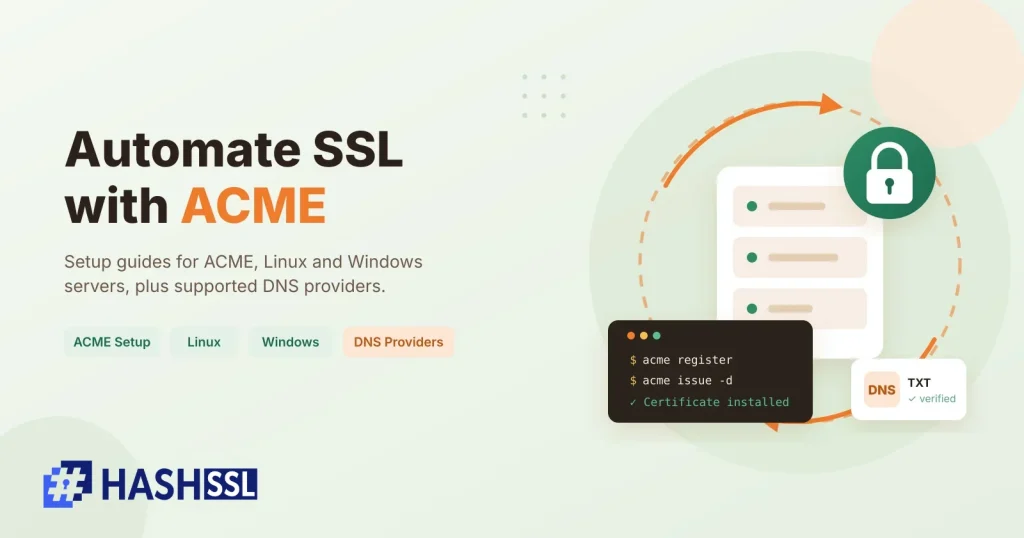
Quick Answer: The ACME protocol (Automatic Certificate Management Environment) is an open standard, published as RFC 8555, that lets software on your server request, validate, renew, and revoke SSL/TLS certificates from a Certificate Authority (CA) without manual steps. The ACME client proves you control the domain by completing a challenge, the CA issues the certificate, and the client repeats the process before the certificate expires.
How many SSL/TLS certificates do you manage, and when does each one expire? If the answer lives in a spreadsheet or a calendar reminder, you are relying on someone remembering to generate a CSR, complete validation, install the new certificate, and reload the web server every time, for every site. Shorter lifetimes affect code signing too, so also read our blog on Code Signing Certificate Validity Is Shortening.
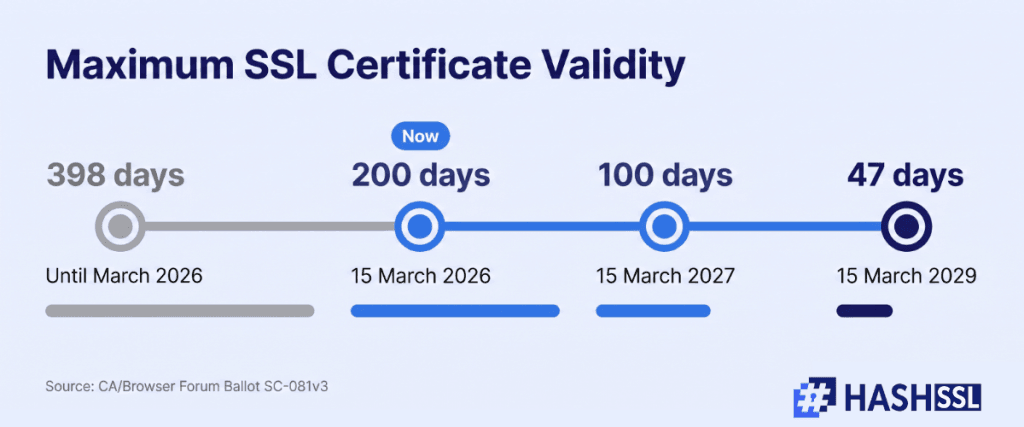
That routine is getting harder to keep up with. Under CA/Browser Forum Ballot SC-081v3, the maximum lifetime of a publicly trusted TLS certificate fell to 200 days on March 15, 2026. It drops to 100 days in March 2027 and 47 days in March 2029, Read here. More renewals mean more chances to miss one.
If you want to understand how ACME SSL works before you automate or buy an ACME-ready certificate, then this blog is just for you.
What Is the ACME Protocol?
ACME is a communication protocol between two parties:
- ACME client: The software running on or near your server.
- ACME server: The endpoint operated by a CA.
The client sends signed messages over HTTPS to create an account, order a certificate, prove control of the domain names, and download the issued certificate. Because every step is an API call, the whole process can run on a schedule without anyone touching it.
ACME was developed by the Internet Security Research Group for Let’s Encrypt and became an IETF standard in March 2019. Today it is used by free CAs such as Let’s Encrypt and by commercial CAs that offer ACME for selected products.
Important: ACME is not a CA, not a type of certificate, and not an encryption method. It only automates how a certificate is requested, validated, and renewed. An ACME-issued certificate is a standard X.509 certificate, and OV or EV organization checks are still done separately by the CA.
How Does ACME SSL Work?
The exact sequence depends on your client and CA, but a typical issuance follows these steps:
- Purchase Certificate: Purchase Automation or ACME supported SSL Certificate from Supported Provider
- Create an account: The client generates an account key and registers it with the CA’s ACME server. Some CAs also ask for External Account Binding (EAB) credentials here to link the ACME account to your customer account.
- Place an order: The client lists the domain names the certificate should cover.
- Receive challenges: The server returns one or more challenges for each domain.
- Complete a challenge: The client publishes the required token, such as a file on your website or a DNS TXT record.
- Validation: The CA checks the token from its side. If it matches, the domain is authorized.
- Submit the CSR: The client sends a Certificate Signing Request for the new certificate.
- Issuance: The CA issues the certificate once all checks pass.
- Deploy: The client downloads the certificate and, if configured, installs it and reloads the web server.
- Renew: On a schedule, the client checks expiry and repeats the process.
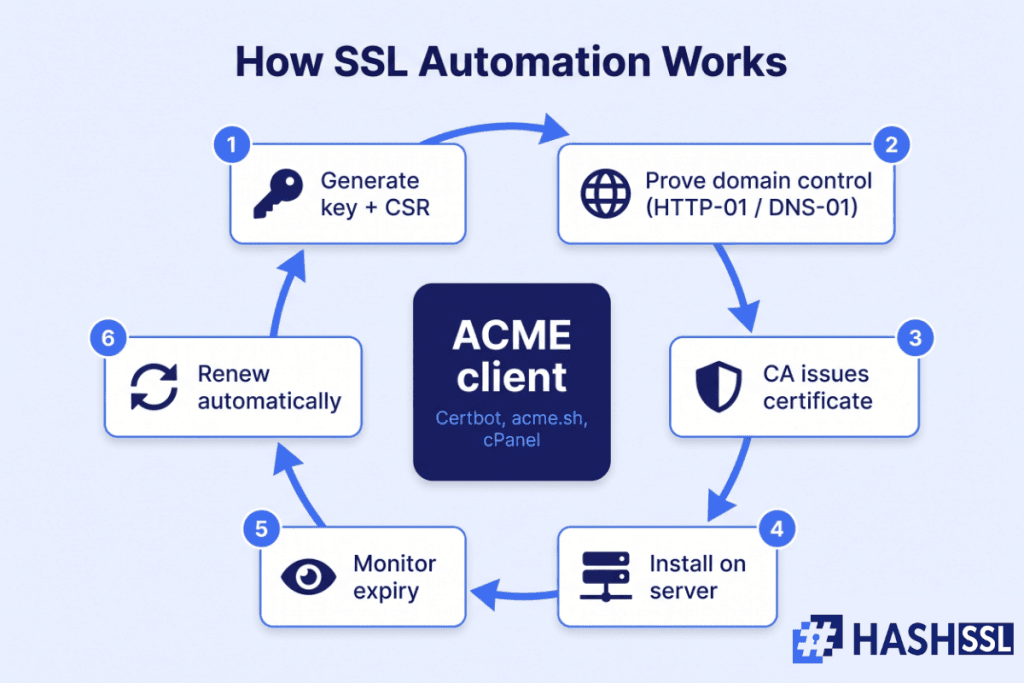
Steps 3 to 5 are domain control validation, the same check a CA performs for any DV certificate. ACME simply automates it. To understand the manual version, read our guide on how to complete domain control validation.
What Are the ACME Challenge Types?
A challenge is how the CA confirms you control a domain. Three types are widely used. Not every CA or client supports all three, so check both first.
- HTTP-01: The client places a token file at /.well-known/acme-challenge/ and the CA fetches it over port 80. See the Let’s Encrypt challenge types page for details.
- DNS-01: The client creates a TXT record at _acme-challenge.yourdomain.com and the CA checks DNS for it.
- TLS-ALPN-01: The CA connects on port 443 using the acme-tls/1 protocol, and the client answers with a temporary certificate containing the token (RFC 8737).
Important: Only DNS-01 can validate wildcard certificates. HTTP-01 and TLS-ALPN-01 cannot be used for names like *.example.com.
| HTTP-01 | DNS-01 | TLS-ALPN-01 | |
|---|---|---|---|
| Where the token goes | File on the website | DNS TXT record | Temporary TLS certificate |
| Port needed | 80 | None on your server | 443 |
| Wildcard names | No | Yes | No |
| Main risk | Port 80 blocked or redirected | DNS delays, exposed API credentials | Limited client support |
Which Challenge Type Should You Choose?
Pick the method that matches the access you have.
| Your situation | Recommended method |
|---|---|
| One web server with port 80 open | HTTP-01 |
| You need a wildcard certificate | DNS-01 |
| Your server is not publicly reachable | DNS-01 |
| Many load-balanced servers | DNS-01, or validate on one central host |
| Proxy or platform that cannot use port 80 | TLS-ALPN-01, if supported |
| Shared hosting or cPanel with SSH access | HTTP-01 with acme.sh |
Ideal for DNS-01: Administrators with DNS API access who manage wildcards, internal servers or many domains from one place.
Tip: DNS changes can take time to propagate. Set your client to wait before asking the CA to validate.
What Are ACME Clients and Certificate Authorities?
The client and the CA are separate choices. The client is software you run. The CA is the organization that signs your certificate. Most standards-compliant clients can work with any ACME CA if you give them the CA’s server URL and, where needed, EAB credentials.
Common clients include:
- Certbot: Maintained by the EFF, with plugins for Apache and Nginx.
- acme.sh: A shell script client that does not need root access for most modes, which suits shared hosting and cPanel.
- Caddy: A web server that obtains and renews certificates automatically.
- win-acme and Posh-ACME: For Windows and IIS.
- cert-manager: For Kubernetes.
Let’s Encrypt is the best-known ACME CA, and it works well for personal sites and testing. But free comes with limits that matter once your website earns money or handles customer data:
- DV certificates only: There are no OV, EV or code signing certificates, so visitors see no verified business identity.
- No warranty: Let’s Encrypt does not offer one, while paid certificates include warranty cover depending on the product.
- Community support only: Help comes from a community forum, not a support team you can contact when a validation or renewal fails. HashSSL offers free chat and ticket support 24 X 7.
- Strict rate limits: Issuance limits can slow down large or fast-growing setups.
Paid ACME certificates from commercial CAs such as Sectigo and DigiCert use the same RFC 8555 protocol and the same automation, with business-grade extras: OV and EV validation levels where the product supports them (the CA validates your organization first), warranty cover, and a support team you can reach. Access usually comes through EAB credentials tied to your account and the specific product.
HashSSL’s Sectigo ACME Certificate-as-a-Service gives you those EAB credentials for Certbot, acme.sh or any standard ACME client, so you keep the automation and add the support and trust of a commercial CA.
How Do You Set Up ACME SSL?
Here are two common setups. Both use HTTP-01 through your website’s document root.
Option 1: Certbot on a server with root access
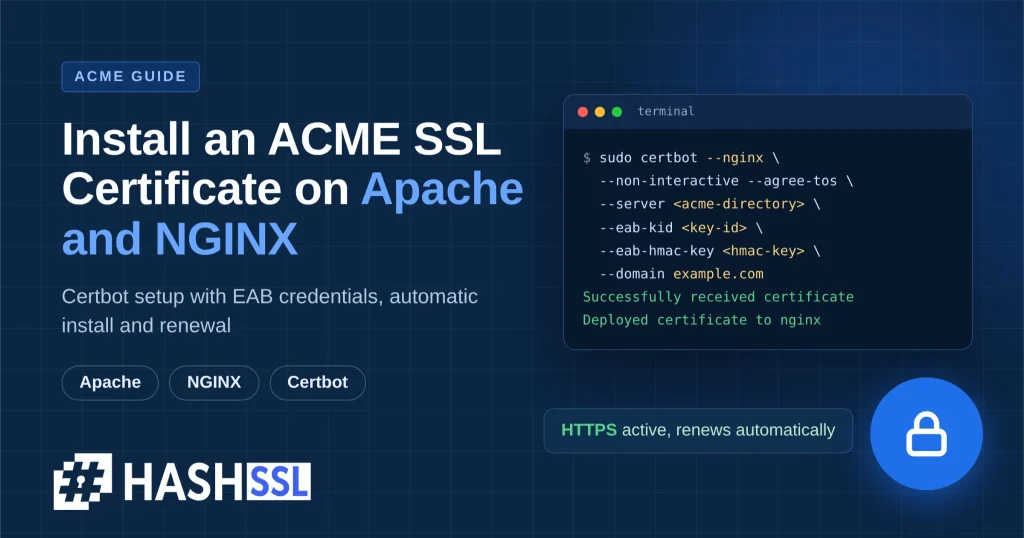
sudo certbot certonly \
  --server SERVER \
  --eab-kid EAB_KID \
  --eab-hmac-key EAB_HMAC_KEY \
  --webroot -w /var/www/example \
  -d example.com -d www.example.com \
  --deploy-hook "systemctl reload nginx"

sudo certbot renew --dry-run
Option 2: acme.sh on shared hosting or cPanel (SSH access required)
curl https://get.acme.sh | sh~/.acme.sh/acme.sh --register-account --server SERVER --eab-kid EAB_KID --eab-hmac-key EAB_HMAC_KEY~/.acme.sh/acme.sh --issue --webroot /home/username/public_html -d example.com -d www.example.com --deploy-hook cpanel_uapi --server SERVER --eab-kid EAB_KID --eab-hmac-key EAB_HMAC_KEY
For a wildcard certificate, use DNS-01 instead. This example uses the Cloudflare DNS API:
export CF_Token="YOUR_DNS_API_TOKEN"~/.acme.sh/acme.sh --issue -d example.com -d '*.example.com' --dns dns_cf --server SERVERReplace the placeholders: SERVER is the ACME server URL from your CA. EAB_KID and EAB_HMAC_KEY are the EAB credentials from your certificate provider. Use your own domain, document root and DNS provider in every command. For Let's Encrypt, leave out --server for Certbot and the EAB options.
For the full cPanel walkthrough, see our cPanel ACME SSL setup guide.
How Does ACME Automate SSL Renewal?
If you want to know how to automate SSL renewal, ACME is the mechanism most tools use. A typical automated renewal works like this:
- A scheduled task (a cron job, systemd timer, Windows scheduled task, or a built-in service like Caddy) runs the client regularly.
- The client checks each certificate’s expiry and renews when it is getting close.
- If renewal is due, the client places a new order and completes any required challenges.
- The client downloads the new certificate and runs a deploy hook to install it and reload the service.
Some clients also support ACME Renewal Information (RFC 9773), which lets the CA suggest when each certificate should be renewed.
Tip: Always run a dry run after setup and after any configuration change. For acme.sh, force a renewal test with ~/.acme.sh/acme.sh --cron --force.
Important: An issued certificate is not the same as a served certificate. A renewal can succeed at the CA while your website keeps showing the old certificate because the web server was never reloaded. Check what visitors actually receive with an SSL checker or this command:
openssl s_client -connect example.com:443 -servername example.com 2>/dev/null | openssl x509 -noout -dates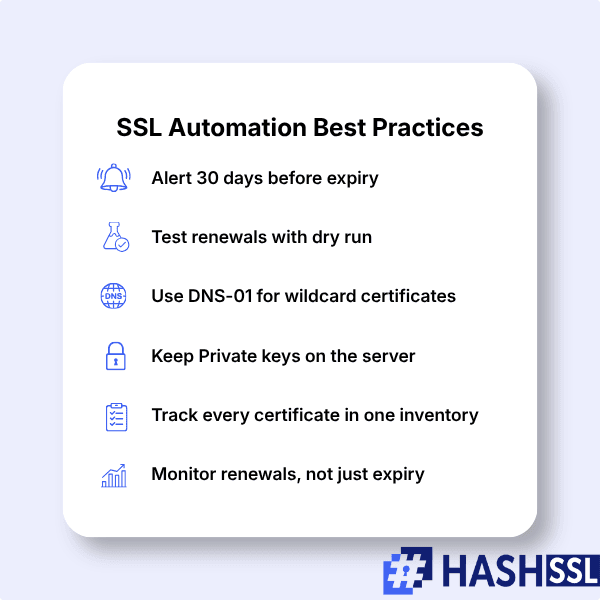
Why Is My ACME Renewal Failing?
If an automated renewal does not complete, check these common issues first:
- Port 80 blocked or redirected: Firewalls, CDNs, maintenance pages or redirect rules can block /.well-known/acme-challenge/ and break HTTP-01.
- DNS TXT record not found: Check the record name, the value and the propagation time. Make sure your DNS API token has the right permissions.
- Web server not reloaded: The new certificate is issued but the old one is still served. Confirm your deploy hook runs and reports no errors.
- Expired or changed EAB credentials: Check that the credentials from your CA are still valid.
- Rate limits: CAs limit issuance. For example, allows 50 certificates per registered domain every 7 days and 5 failed validations per domain per account per hour. Use the CA’s staging environment while testing.
- Scheduler not running: Confirm the cron job or timer is active.
- CAA record mismatch: Your DNS policy must allow the issuing CA.
Tip: A failed renewal does not remove your current certificate. You have until the expiry date to fix the cause, so run a dry run as soon as you see an error.
Is ACME Better Than Manual SSL Management?
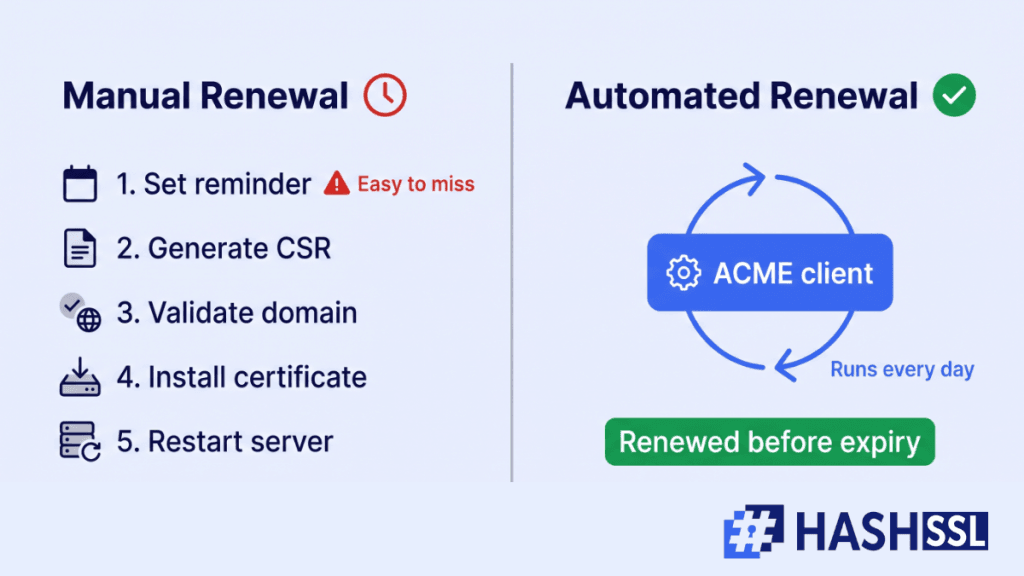
Manual management is not wrong. For a single certificate on a server you rarely touch, or for devices with no ACME support, it can be the practical choice. Automation pays off as your certificate count grows and lifetimes shrink.
Want a deeper comparison? Read our article on ACME automation vs manual SSL certificate management. It explains how each approach handles renewals, deployment, monitoring, and scale, so you can decide which one suits your setup.
Can You Use ACME with a Commercial SSL Certificate?
Yes, but buying a certificate and automating it are two separate decisions. The certificate product sets the validation level (DV, OV or EV), coverage (single domain, multi-domain or wildcard), warranty and support. ACME only decides how the certificate is requested, validated and renewed.
Whether a commercial certificate can be automated depends on four things:
- The CA: It must run an ACME server.
- The product: CAs often enable ACME per product, so check the exact certificate you plan to buy.
- The client: It must support EAB if the CA requires it, and the challenge type you need.
- Your environment: Your server, hosting panel, load balancer or CDN must accept automated deployment.
Important: For OV and EV certificates, ACME automates the domain checks only. The CA still has to validate your organization before the order can be issued.
Before you buy, ask your provider:
- Does this exact product support ACME, and at which validation levels?
- Do I need EAB credentials, and where do I get them?
- Which challenge types are supported, and can I get wildcard names?
- Are multi-domain (SAN) names supported through ACME?
- Which clients are tested or documented?
- What happens at the end of the subscription term?
HashSSL offers a Sectigo ACME Certificate-as-a-Service plan that provides EAB credentials for standard RFC 8555 clients, and AutoInstall SSL for supported servers. Compare the supported platforms on each page before you buy.
Conclusion
The ACME protocol gives your server a standard way to prove domain control and get certificates from a CA without manual work. With public certificate lifetimes now at 200 days and heading to 47, it is becoming the practical default for websites, hosting providers and cloud services.
Use HTTP-01 for single web servers, DNS-01 for wildcards and non-public servers, and TLS-ALPN-01 only where your platform supports it. Before you buy, confirm that the CA and the exact product support ACME, that your client supports the challenge and EAB you need, and that you can test, deploy and monitor every renewal. Check your results with a dry run and an SSL checker.
Want to see where your current certificates stand? Run your domain through the HashSSL SSL Checker to check its expiry date, or contact our team to confirm which certificates can be automated in your setup.
Frequently Asked Questions
What does ACME stand for?
Automatic Certificate Management Environment, as named in RFC 8555.
What is the ACME protocol used for?
Automating the issuance, renewal, and revocation of certificates, most often SSL/TLS certificates for websites.
Is ACME a Certificate Authority?
No. ACME is the protocol a client uses to talk to a CA. Let’s Encrypt, Sectigo, and DigiCert are CAs that offer ACME.
Is ACME the same as SSL/TLS?
No. TLS encrypts connections between browsers and your server. ACME manages the certificates that TLS uses.
Is ACME free to use?
The protocol is an open standard and many clients are free. The certificate may or may not be free. Let’s Encrypt charges nothing for DV certificates, while commercial CAs charge for ACME-enabled products that may include OV or EV validation, warranties, and support.
What is the difference between ACME and Certbot?
ACME is the protocol. Certbot is one client that implements it.
Can ACME automatically renew SSL certificates?
Yes, when the client runs on a schedule, domain validation still succeeds, and the new certificate is deployed correctly.
What is the difference between HTTP-01 and DNS-01?
HTTP-01 proves control by serving a file on port 80. DNS-01 proves control with a DNS TXT record and is the only one of the two that supports wildcards.
Can ACME issue wildcard certificates?
Yes, through DNS-01, if your CA and product support wildcards.
Do commercial SSL certificates support ACME?
Some do. Support depends on the CA and the specific product, so check before you buy.
What is the difference between Auto SSL and Let’s Encrypt?
Let’s Encrypt is a free CA that issues DV certificates through ACME. Auto SSL and managed SSL services usually use commercial certificates with support and, depending on the product, other validation levels or warranties.
What happens if ACME renewal fails?
Your current certificate stays valid until its expiry date. Fix the cause, run a dry run, and renew before it expires.
Is ACME suitable for business environments?
Yes, especially where many certificates are involved. Larger teams usually combine ACME with central monitoring, commercial products with EAB, and clear rules for handling keys and credentials.